Version: 0.14.2
Portable Piecepack Notation (PPN) is a human-readable plaintext file format for storing board games. The default Movetext parser is designed to be provide a fairly flexible notation system out of the box for playing a large variety of games but the structure is designed allow support for parsing alternative notation systems in the future as well. Originally intended for notating piecepack games, it also provides some support for other game systems as well. There is a prototype parser for this file format written in R that can be used to generate 2D/3D graphical images, plaintext Unicode diagrams, and animations for the games saved in this file format.
Warning
The “Portable Piecepack Notation” is in alpha development and the specification is not likely to remain stable. I’d appreciate alpha testers to test things out but probably not a good idea to start storing large amount of games in the format just yet.
Contents
Examples
Chess
An example game of chess:
---
GameType: International Chess
...
{"The Immortal Game: Adolf Anderssen - Lionel Kieseritzky, 1851"}
1. e2-e4 1... e7-e5 2. f2-f4 2... e5:f4
3. f1-c4 3... d8-h4 4. e1-f1 4... b7-b5
5. c4:b5 5... g8-f6 6. g1-f3 6... h4-h6
7. d2-d3 7... f6-h5 8. f3-h4 8... h6-g5
9. h4-f5 9... c7-c6 10. g2-g4 10... h5-f6
11. h1-g1 11... c6:b5 12. h2-h4 12... g5-g6
13. h4-h5 13... g6-g5 14. d1-f3 14... f6-g8
15. c1:f4 15... g5-f6 16. b1-c3 16... f8-c5
17. c3-d5 17... f6:b2 18. f4-d6 18... c5:g1
19. e4-e5 19... b2:a1 20. f1-e2 20... b8-a6
21. f5:g7  21... e8-d8 22. f3-f6 22... g8:f6
23. d6-e7 {checkmate!}
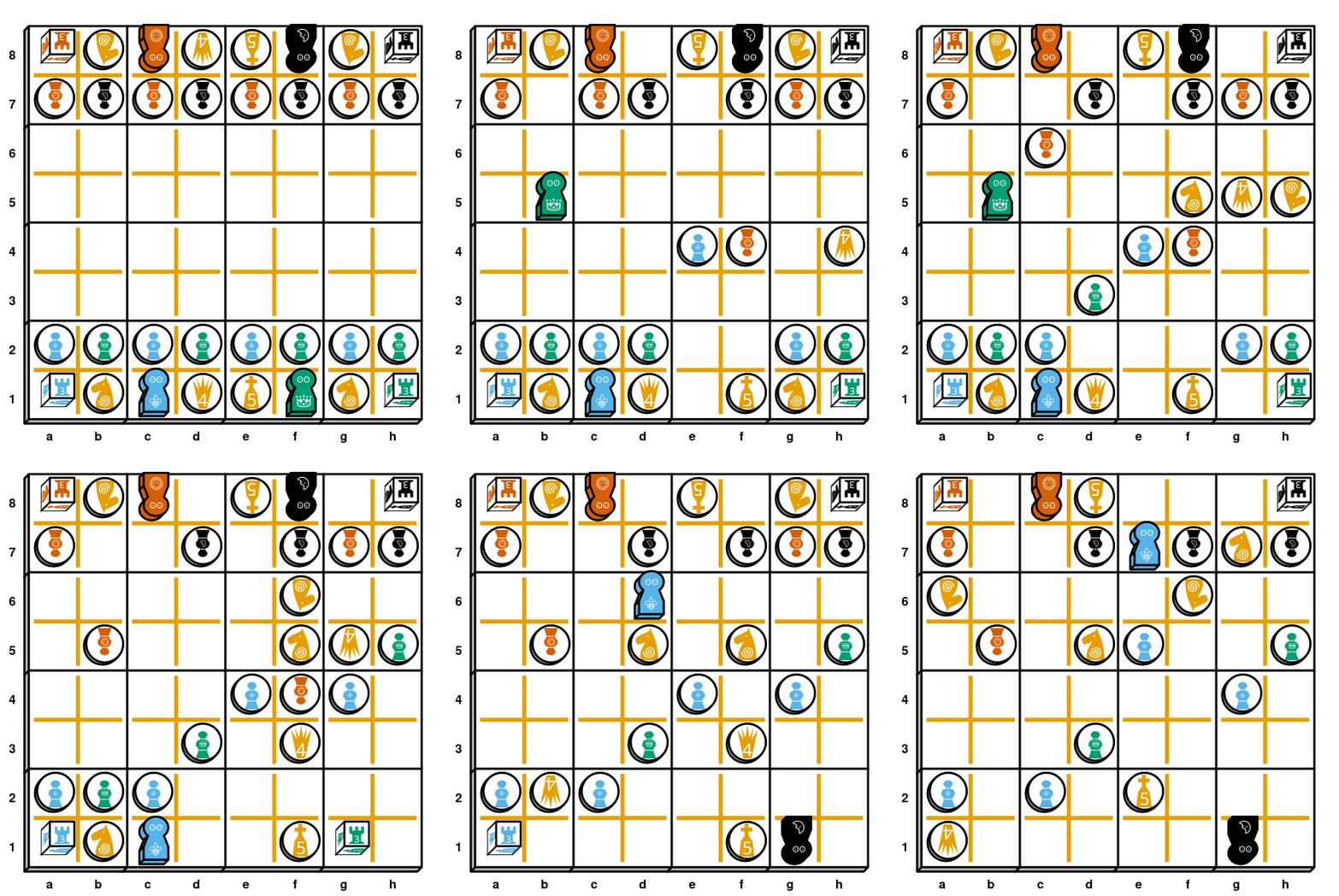
Checkers
An example game of checkers:
---
GameType: American Checkers
...
1. e3-d4 1... d6-e5 2. d2-e3 2... h6-g5
3. g3-h4 3... e7-d6 4. f2-g3 4... b6-a5
5. g3-f4 5... e5-g3;*f4 6. h2-f4;f4-h6;*g3*g5 6.... c7-b6
7. c1-d2 7... f6-e5 8. d4-f6;*e5 8... g7-e5;*f6
9. e3-d4 9... e5-f4 10. d4-e5 10... d6-c5
11. c3-b4 11... c5-d4 12. d2-e3 12... f4-d2;*e3
13. e1-c3;*d2 13... d4-e3 14. c3-d4 14... e3-d2
15. b4-c5 15... d2-e1;Mv@e1 16. b2-c3 16... 2e1-d2
17. a3-b4 17... 2d2-e3 18. a1-b2 18... d8-c7
19. b2-a3 19... f8-e7 20. c5-d6 20... e7-c5;*d6
21. b4-d6;*c5 21... 2e3-c5;2c5-e7;*d4*d6 22. g1-f2 22... 2e7-d6
23. e5-f6 23... b6-c5 24. f2-e3 24... a7-b6
25. h4-g5 25... 2d6-e5 26. f6-e7 26... b8-a7
27. e7-d8;A@d8 27... c5-d4  28. e3-c5;*d4 28... b6-d4;d4-b2;*c3*c5
29. 2d8-b6;*c7 29... a7-c5;*2b6 30. g5-f6 30... 2e5-g7;*f6
31. h6-f8;*2g7 C@f8 31... b2-c1;Sv@c1 32. 2f8-e7 32... a5-b4
33. 2e7-d6 33... b4-c3 34. 2d6-b4;2b4-d2;*c3*c5 34.... 2c1-e3;*2d2
35. a3-b4 35... 2e3-d4 36. b4-a5 36... 2d4-c5
37. a5-b6 37... 2c5-a7;*b6
Desfases
An example game of Desfases:
---
GameType:
    Name: Desfases
    Seed: 42
...
1S. ?S{n,a,2,3,5}@>90; a1-a4; ?Sd~3
1M. ?M{n,a,2,4,5}@>90; e3-c1; ?Md~2
1C. ?C{n,2,3,4,5}@>90; e2-e4; ?Cd~n
1A. ?A{n,a,2,4,5}@>90; b5-e5; ?Ad~2
2S. ?S{a,2,4}@>90; a4-b3; ?Sd~2
2M. ?M{0..4}@>90; c1-b2; ?Md~a
2C. ?C{0..5}@>90; &?dC[2]-c3; ?Cnc{~b,_%?Cd}
2A. ?A{0..4}@>90; e5-d4; ?Ad~a
3S. ?S{n,a,3,4,5}@>90; b3-a2; ?Sd~a
3M. ?M{0..4}@>90; b2-a3; ?Md~n
3C. ?C{1..5}@>90; &?dC[2]-e5; ?C4c{~b,_%?Cd} ?Cd~4
3A. ?A{a,2,3,5}@>90; d4-d2; ?Ad~n
4S. ?S{n,a,2,4,5}@>90; a2-b2; ?Sd~n
4M. ?M{0..4}@>90; &?dM[2]-b3; ?M2c{~b,_%?Md} ?Md~2
4C. ?C{0..5}@>90; e4-a4; ?Cd~3
4A. ?A{n,2,3}@>90; &?dA[2]-d3; ?Aac{~b,_%?Ad} ?Ad~a
5S. ?S{n,a,4}@>90; &?dS[2]-a2; ?Snc{~b,_%?Sd} ?Sd~n
5M. ?M{n,a,2,3,5}@>90; a3-a1; ?Md~a
5C. ?C{0..4}@>90; a4-b3; ?dC~2
5A. ?A{n,2,3,4}@>90; d2-e2; ?dA~n
6S. ?S{n,a,5}@>90; &?dS[2]-c2; ?S2c{~b,_%?Sd} ?Sd~2
6M. ?M{n,a,2,3,5}@>90; a1-a3; ?Md~n
6C. ?C{n,2,4}@>90; b3-a4; ?Cd~a
6A. ?A{0..3}@>90; &?dA[2]-e3; ?A2c{~b,_%?Ad} ?Ad~2
{ 15 more rounds to complete a full game... }

Four Field Kono
An example game of Four Field Kono:
GameType: Four Field Kono

1. b1:b3 1... d3:b3 2. c1:c3 2... a3:c3 3. c2-c1 3... b4:b2 4. a1-b1 4... b3:b1
5. d1:b1 5... c3-c2 6. a2-a3 6... b2:d2 7. a3-b3 7... c4-c3 8. c1-d1 8... d4-d3
9. b1-b2 9... d2:b2 10. b3-a3 10... b2-b1 {Player 1's loss is assured with the
 separation of their two remaining pieces and they should resign in a real game}
11. a3-a2 11... b1-c1 12. d1-d2 12... c1-d1 13. a2-a3 13... a4-b4
14. a3-a4 14... b4-c4 15. a4-b4 15... c4-d4 16. b4-a4 16... d4:d2 {Player 2 wins}
Fuji-san
A game of Fuji-san with a specific starting coin setup:
---
GameType:
  Name: Fujisan
  Coins: "44452n24n3aa/a25335325ann"
...
1. a1-b1 2. n2-k2 3. b1-e1 4. e1-j1 5. j1-j2 6. j2-l2 7. k2-m2 8. m2-m1
9. l2-l1 10. n1-k1 11. m1-i1 12. i1-d1 13. d1-d2 14. l1-i1 15. i1-i2 16. k1-k2
17. k2-e2 18. i2-c2 19. a2-f2 20. e2-h2 21. h2-g2 22. c2-h2 23. h2-h1 24. d2-h2
25. f2-b2 26. b2-b1 27. b1-g1

Ice Floe
A game of Ice Floe:
---
GameType: Ice Floe
...
PlacePawns. pS@e11 pM@k6 pC@f0 pA@(0,5)
RollDice. dS5@f11 dMa@k5 dC3@e0 dA2@(0,6)
PlacePyramids. xn{S@h7,M@d5,C@j1,A@b1}; xa{S@d3,M@f3,C@j9,A@f9};
               x2{S@b5,M@b9,C@h1,A@j3}; x3{S@h5,M@d9,C@d7,A@f1};
               x4{S@h9,M@b3,C@d1,A@b7}; x5{S@h3,M@j7,C@f7,A@j5};
Round1. ?xS4-3L; ?xM3-f10; *4?Ca; ?xC2-g3; ?xAn-d4;-h4; *4?C2;
        ?d{S~5,M~n,C~n,A~a} . c5A@g11 c4A@k4 c3A@d0 cnS@(0,7) . *2?An . *?M2
Round2. ?xMn-3L;-2U; ?xC3-b8; *4?S4; ?xA3-3R; ?xSa-3L;
        ?d{S~5,M~a,C~n,A~a} . 2@g0; 2@d11; a@h0; */cf; ?c5~C ?c{4,3,n}~S . *2?Sn; *?S3
Round3. ?xC4-4R; ?xA3-3L; ?xSn-3L; ?xM2-2SE;-f8; *4?Aa;
        ?d{S~5,M~4,C~5,A~5} . ?c{5,3,n}~M ?c4~C . *2?M5 . *?S5
Round4. ?xA3-2UL;-b4;*4?A2; ?xS2-4U; 2?Ma-2U; ?xC4-i3;
        ?d{S~3,M~3,C~2,A~3} . ?c{5,4}~C ?c3~A ?cn~M;
        a@(0,4); 2@k3; 2@(0,3); a@{k2,d11} . */cf; *3?C3; *?M4
{ Final coins: Suns: none; Moons: none; Crowns: none; Arms: none }
{ Final score: Suns: 3, Moons: 2, Crowns: 3, Arms: 0 }
Japan
An example game of Japan:
---
  GameType:
    Name: Japan
    Seed: 42
...
1R. R`6-3'<@(10.5,3)
1B. B`4-4'<@(2.5,5)
2R. R`1-5'@(12,4.5)
2B. B`6-4'@(4,6.5)
3R. R`5-2'<@(7.5,2)
3B. Ada@(7,1); (8,1)-(15,3)
4R. R`0-1'@(13,2.5)
4B. (7,1)-(14,3); ?Ad~5; (14,2)-(15,2)
5R. Sp@(12,2); (12,3)-(0,4)
5B. B`2-6'<@(1.5,6)
6R. Sda@(1,4); (1,5)-(0,5)
6B. Ap@(2,7); (1,7)-(15,3)
7R. R`2-0'<@(12.5,7)
7B. B`2-1'@(11,7.5); (12,8)-(15,3)
8R. R`1-3'<@(13.5,6); (14,7)-(0,4)
8B. B`0-2'@(5,2.5)
9R. R`5-5'@(11,5.5); (12,6)-(0,2)
9B. B`1-5'<@(2.5,3)
10R. R`3-3'@(10,4.5); (11,4)-(0,6)
10B. B`1-1'@(3,1.5)
11R. R`6-1'@(1,2.5); *(2,2)
11B. B`5-4'<@(8.5,4)
12R. R`6-2'<@(9.5,2)
12B. B`3-1'>@(3.5,4)
13R. R`6-4'@(9,6.5)
13B. (14,3)-(10,7); (10,7)~4; (10,6)-(15,4)
14R. R`6-0'@(8,5.5); (9,5)-(0,5)
14B. (8.5,4){~v,-(14\,2.5)} B`0-0'<@(8.5,4)
15R. R`6-5'@(7,4.5)
15B. B`6-3'@(6,4.5)
16R. */Sp
16B. B`6-5'<@(6.5,6)
17R. R`6-6'<@(3.5,8)
17B. ?Ad-(3,6); ?Ad~3; (3,7)-(15,7)
18R. (3.5,8)-(7.5,8) R`0-0'>@(3.5,8)
18B. B`6-6'<@(5.5,7)
19R. R`2-4'@(12,1.5)
19B. ?Ad-(14,5); ?Ad~2
20R. ?Sd-(6,3); ?Sd~5; (6,2)-(0,3)
20B. */Ap
21R. Sp@(8,3); (7,3)-(0,6) (9,3)-(0,7)
21B. Ap@(13,4); (14,4)-(15,6) (13,5)-(0,2)
22R. */Sp
22B. */Ap
23R. Sp@(11,2); (11,1)-(0,5)
23B. Ap@(5,5); (4,5)-(15,5) (5,4)-(15,4) (5,6)-(15,7)
24R. ?Sd-(7,7); ?Sd~4; (8,7)-(0,7)
24B. ?Ad-(4,1); ?Ad~n
25R. ?Sd-(4,3); ?Sd~3; (4,2)-(0,6)

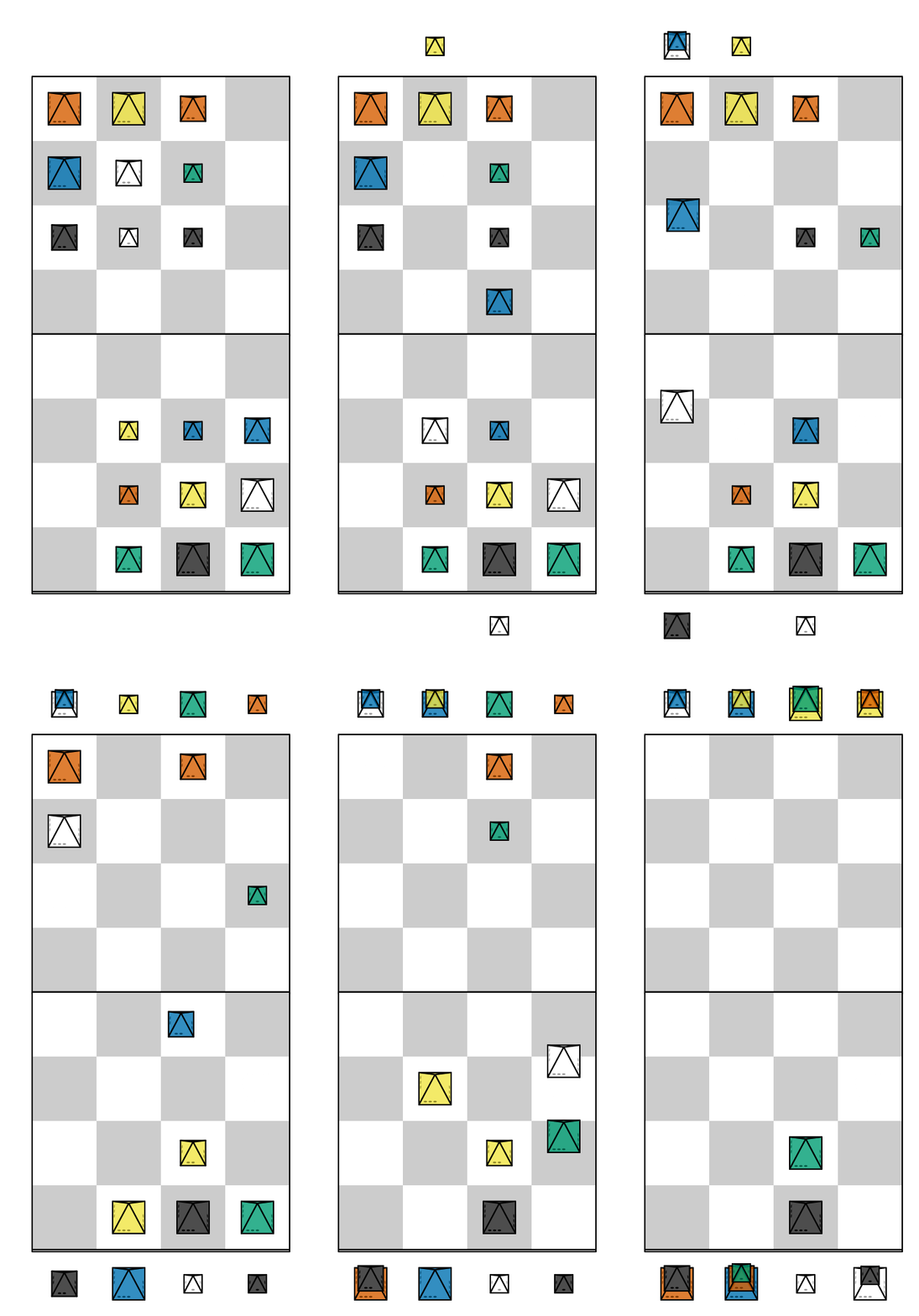
Martian Chess
An example game of Martian Chess:
---
MovetextParser: Icehouse
GameType:
  Name: Martian Chess
  Seed: 42
...
1. d3-d4 1... b6-c5
2. d4-c4 2... b7-b5
3. c5-c0 c4-c5 3... b3-b9 b5-b3
4. b3-a3 4... c3-a9 c5-c3
5. d2-d3 5... c7-d6
6. a6-a0 d3-a6 6... a3_%a9 a6-a3
7. a7-b0 a3-a7 7... b2-d9 b8-b2
8. c3-c4 8... c6-b5
9. b5-d0 b2-b5 9... b1-c9 b5-b1
10. c4-a4 10... a4_%b9 a7-a4
11. a8_%a0 a4-a8 11... d6-c7
12. b1-b3 12... a8-d5
13. d5_%d0 d1-d5 13... b3_%c9 d5-b3
14. b3-c4 14... c8_%c7
15. 2c7-b0 c4-c7 15... c2_%d9 c7-c2
Plans of Action
An example game of Plans of Action:
---
GameType:
    Name: Plans of Action
    Coins: SASASS/MMACSS/CACCAA/MCMCMM
...
(5,3)-4U; (3,3)-2L; 5(5.5,5.5)$>90!; (5,5)-4L; (2,5)-3R;-2D; (3,5)-2D;
({2..7},3)-2D; (3,4)-3U; (4,5)-2U; (6,4)-3L;-4U; (6,6)-2U; (2,6)-4R; (1,5)-4R;
(7,6)-3D;-2L; (4,6)-3R; (6,6)-3D;-3L; (5,3)-3L; (7,6)-3D; (3,3)-2U; (7,3)-3L;
({3,5,6,7},5)-2D; (5,4)-4L; (1,3)-3U; (5,7)-3D; (1,4)-5R; (1,6)-2D; (7,4)-2U;
(3,6)-3R; (5,6)-2L;-2D; ({1..6},4)-2D; (4,7)-2D;-2R; (3,7)-3D;-2R; (3,8)-2D;
(6,8)-2L;-2D; (6,5)-3U;-2R;-2D; (5,4)-2U;
Relativity
An example game of Relativity:
---
Round: Night
GameType:
    Name: Relativity
    Coins: "n45a5n/3a2243/3n4a2n/a25345"
...
{ Notes: Space has power of adjacency while Time has power of sequence }
1S. d3#e3 1T. d3#d1
2S. c2#c3 2T. d2#b1;M2@e6
3S. b2#a2 3T. e3#b2
4S. f1#f4 4T. e2#a3;M3@e6
5S. c4#d4 5T. f1#a1
6S. c1#c4;M5@b6 6T. b3#a3
7S. f3#a3 7T. d1#a3
8S. f2#f3 8T. b1#d2
9S. f3#a3;Mn@b6 9T. e2#c2
10S. e1#f1 10T. f1#d4
11S. c2#c3 11T. d4#c4
12S. b2#c2 12T. c1#e2;Ma@e6

Tablut
An example game of Tablut:
---
GameType: Tablut
...
1. a4-a3 1... c5-c3 2. d1-d3 2... e7-c7
3. f1-f3;*e3 3... e4-e3;*d3 4. f9-f7 4... g5-g3;*f3
5. h5-g5 5... d5-d1 6. d9-d3 6... f5-f1;*e1
7. a3-b3;*c3 7... c7-c3;*d3 8. i4-e4;*e3 8... g3-e3;*e4
9. i5-i4 9... e5-f5 10. i6-f6 10... f5-f4
11. a5-a4 11... f4-g4 12. e2-g2 12... e3-g3
13. f6-f4 13... e6-e4;*f4 14. f7-f4 14... g4-h4
15. f4-g4;*h4
Tic-Tac-Toe
A simple game of Tic-Tac-Toe with no automatic setup:
---
Event: Example Tic-Tac-Toe Game
Result: 1-0
...
setup. t@b2
1. S@b2 1... M@a2 {? (1... M@a1)}
2. S@c1 2... M@a3
3. S@a1 3... M@c3
4. S@b1 {X wins}
PPN File Structure
PPN files are text files ending in .ppn containing one or more games in PPN notation.
- Each game in the file should start with a line beginning with ---
- This line is recommended but optional for the first game in a PPN file. If the first game in each PPN file begins with a --- then one can build larger PPN file archives by simply concatenating smaller PPN files together (i.e. with the *nix cat command).
- Each game starts with a Metadata section and ends with a Movetext section.
- PPN files should be assumed to use an UTF-8 character encoding (this includes ASCII) with no maximum line length.
Metadata
- The Metadata section should be a single “Mapping” expressed in YAML.
- It should begin with a line starting with ---
- This is the same --- we said begins each game.
- The --- is recommended but optional for the first game in a PPN file.
- It should end with a line starting with ...
- This ... is recommended but optional if the Metadata section does not have any empty lines and there is at least one empty line between the Metadata and Movetext sections.
- If there are no lines starting with ... and no empty lines the Metadata section should be assumed to be empty.
- All Metadata keys are optional.
- If the Metadata section is empty PPN parsers should use the default Movetext parser described in a later section to interpret the Movetext (without doing any initial game piece setup).
- One can specify the Movetext parser to use (possibly a diferent one for each game) via the MovetextParser key with a string indicating the parser to use. Movetext parsers are passed both the Metadata section and the Movetext section.
Movetext
- Regardless of the Movetext parser to be used the Movetext should not have any lines starting with --- or ...
- Should be (initially) parsed as UTF-8 text without restrictions on line length.
- Additional restrictions based on which Movetext parser is used to parse it. The default Movetext parser and its additional restrictions are described in the Default Movetext Parser section.
Default Movetext Parser
- The default Movetext Parser supports automatic Setup for various piecepack games via the Metadata mapping.
- The default Movetext Parser supports the following Movetext elements:
- Each element needs to be separated from other elements by whitespace
- Whitespace is defined as tabs, newlines, form feeds, and any character in the Unicode Z Category.
- All whitespace between elements (and in comments) will be converted to single spaces.
- The default parser keeps track of the (x,y) coordinates of pieces and an ordering they can be placed on the board to reproduce the state of the board after that move. For convenience we will sometimes refer to pieces placed on the board later (earlier) in this ordering as being placed “above” (“beneath”) those placed earlier (later) in this ordering, please note however that in real life a high stack of pieces placed earlier may physically be “above” an adjacent single piece placed later.
Setup
Currently the Movetext Parser uses the SetUp field in the Metadata to provide game setup, if that field is missing it will use the GameType field to provide game setup. This value should either be a string with the game’s name or a mapping with the field Name with the game’s name and optionally System of the game system to use (for games that can be played with multiple game systems); all other values of this mapping will be passed to the setup.
Although in general tags will treated case sensitive in this case we first process the string by converting to lower case, removing apostrophes and hyphens, “squishing” the whitespace, and converting spaces to underscores e.g. “Nine Men’s Morris” will be treated as equivalent to “nine_mens_morris”. Occasionally we will provide aliases e.g. “Baroque chess” will be treated as an alias for “Ultima”.
GameType example of just string of game’s name for setup:
GameType: Four Field Kono
GameType example that allows passing more info to setup:
GameType:
  Name: Fujisan
  Seed: 11
SetUp and GameType can be used together when a game variant shares its physical setup with another game. GameType records the game being played while SetUp specifies the piece arrangement to use:
GameType: Suicide Chess
SetUp: Chess
A SetUp of None will explicitly do an initial board setup with no pieces at all, useful for games you will set up manually in the movetext:
GameType: Tic-Tac-Toe
SetUp: None
...
setup. t@b2
If there is neither a SetUp field nor a GameType field then this will also result in an initial board setup with no pieces at all.
Parser options
The following built-in parsers are available via the MovetextParser field. They are all built on top of the default parser but differ in their default game system for Setup and their default configuration for colored bits (●):
- piecepack — the standard piecepack parser; this is the default parser used when no MovetextParser is specified (also accessible as default for backwards compatibility)
- alquerque — for alquerque-style games; colored bits use an alquerque configuration
- checker — for checker/draughts games; colored bits use a checkers configuration
- chess — for chess games; colored bits use a chess configuration
- domino — for domino games
- go — for go games; colored bits use a go configuration
- marble — for marble games; colored bits use a marbles configuration
- morris — for Morris games (e.g. Nine Men’s Morris); colored bits use a morris configuration
- tarot — for card games; since French tarot is a superset of the traditional 52-card deck this parser works for both tarot and regular playing card games
Optional arguments can be passed to the parser via the MovetextParser mapping form e.g.:
MovetextParser:
  Name: piecepack
  ScalingFactor: 2
ScalingFactor changes how many “inches” a coordinate unit represents i.e. with ScalingFactor: 2 then a1 corresponds to an x-coordinate of 2 inches and a y-coordinate of 2 inches. Accepted by all parsers.
CellWidth sets the width of each board cell in inches. Valid values are 1 or 2 (default 2). Accepted by the checker and chess parsers e.g.:
MovetextParser:
  Name: checker
  CellWidth: 1
Macros
The default Movetext Parse performs macro substitution in the Movetext.
- Macros are strings surrounded by a ` and ' e.g. `q'@b2 {The default "q" macro is for a black chess queen}.
- Macros can be defined in three places (with any identically named macros earlier in this list replacing those later in the list):
- In a “Macros” field in the Metadata
- By a specified game setup function
- The parser includes some builtin macros.
- Macro names cannot include whitespace nor the semi-colon ;.
- Macro substitution happens after “moves” and “comments” are identified (and split).
Comments
- Comments are any text between braces { and }
- All whitespace will be parsed as single spaces, in particular comments can span multiple lines
- Braces are not allowed within comment braces
- Must have white space before the { and after the } (otherwise will be considered to be a brace expansion)
MoveNumbers
- Ordinary MoveNumbers are one or more letters, numbers, periods, and/or underscores followed by at least one period
- A single period . (surrounded by white space) is a special shortcut for writing the previous MoveNumber with an extra period added to the end of it e.g. 2. a4-b4 . b4-c4 is equivalent to 2. a4-b4 2.. b4-c4
- The semi-colon ; is a special shortcut for writing the minimal a single period MoveNumber (adding some spaces around it if necessary) e.g. 2. a4-b4;b4-c4 is equivalent to 2. a4-b4 . b4-c4 which is equivalent to 2. a4-b4 2.. b4-c4 [1].
- Putting MoveNumbers in one’s Movetext is optional but if they exist PPN parsers will often break down and label moves by MoveNumbers (to make animations of a game or visualize the game state at a particular point in the game).
| [1] | The intention for this is quickly indicating little “submoves” within a larger proper “move” that we’d like to be able to separately visualize but that we don’t want to semantically mark as a completely separate “move”. |
Moves
Moves are comprised of PieceSpec, Location, PieceId, and MoveToken.
One can use Unix-shell-style brace expansions as a shortcut for expressing multiple moves e.g.:
t@{b,d}{2..8..2} {Shortcut for t@b2 t@b4 t@b6 t@b8 t@d2 t@d4 t@d6 t@d8} *{b..f}2 {Shortcut for *b2 *c2 *d2 *e2 *f2}- Unlike Bash-style brace expansions must have a “preamble” or “postscript” otherwise will be interpreted as a comment (but the preamble or postscript can be another brace expansion)
PieceSpec
- The default Movetext parser supports specifying pieces by their Piece, Side, Suit, Rank, Angle, and (game system) Configuration.
- Any attribute specifications beginning with a comma , must go after the other attribute specifications, otherwise it does not matter which order the piece attributes are specified. However the following ordering may improve readability (omitting any unnecessary elements as necessary):
- When necessary the default Movetext will make Assumptions about unspecified elements.
Piece (type)
- t for “tile”
- c for “coin” if piecepack suit and “checkers2” “bit” if colored suit
- d for “die”
- p for “pawn”
- m for “matchstick” if piecepack suit and “meeples” “bit” if colored suit
- s for “saucer” if piecepack suit and “go” stone “bit” if colored suit
- ● or () for “bit”
- ▲ or /\ for “pyramid”
- 🂠 or [] for “card”
- ■ or [X] for “board”
- Defaults to a “checkers2” board
- ⚀, ⚁, ⚂, ⚃, ⚄, ⚅ sets the Configuration to “dice”, Piece to “die”, and sets the appropriate Rank (from 1 to 6).
- The Unicode chess glyphs sets the Configuration to “chess2”, Piece to “bit”, and sets the appropriate Rank (and possibly Suit)
- The Unicode playing card glyphs sets the Configuration to “playing_cards_tarot”, Piece to “card”, and sets the appropriate Rank and possibly Suit.
- The Unicode dominoes glyphs sets the Configuration to an appropriate “dominoes” configuration, Piece to “tile”, and sets the appropriate Rank and Suit.
- ○ indicates a “go” “bit” defaulting to the White Suit.
- ▦ or [#] indicates a “go” “board” defaulting to the Black Suit.
- ⛂ and ⛀ indicate a “checkers2” “bit” face-down (men), and ⛃ and ⛁ indicate a “checkers2” “bit” face-up (kings). Without an explicit Suit, ⛂ and ⛃ default to the Black suit and ⛀ and ⛁ default to the White suit.
Suit and Configuration
- S, M, C, A for “Suns”, “Moons”, “Crowns”, and “Arms” Suit and “piecepack” Configuration
- If a μ or u is present will assume component comes from a (piecepack stackpack) “subpack” Configuration aka “mini piecepack” instead of a normal sized piecepack
- If a ⬢ (U+2B22) is present will assume component comes from a “hexpack” Configuration (a hexagonal piecepack)
- ♥, ♠, ♣, ♦ for “Hearts”, “Spades”, “Clubs”, and “Diamonds” Suit and “playing_cards_expansion” Configuration
- ♡, ♤, ♧, ♢ for (inverted 4-colored) “Hearts”, “Spades”, “Clubs”, and “Diamonds” Suit and “dual_piecepacks_expansion” Configuration
- R, K, G, B, Y, W for “Red”, “Black”, “Green”, “Blue”, “Yellow”, or “White” Suit
- If a “bit” indicated by ●, ○, or s or a “board” indicated by ▦ or [#] then “go”
- If a “bit” indicated by c, ⛂, ⛀, ⛃, or ⛁ or a “board” indicated by ■ or [X] then “checkers2”
- If a dominoes “tile” Piece then an appropriate colored dominoes [2]
- If a “pyramid” Piece then an “icehouse_pieces” Configuration (invented by Andy Looney aka Looney Labs’ “Looney pyramids”)
- If a μ or u is present will assume component comes from a smaller sized set:
- “checkers1” instead of a “checkers2” set
- “chess1” instead of a “chess2” set
- ,sN manually sets the internal “suit” to the positive integer N and ,C' manually sets the internal “configuration” to the string C.
- ⚀, ⚁, ⚂, ⚃, ⚄, ⚅ sets the Configuration to “dice”, Piece to “die”, and sets the appropriate Rank (from 1 to 6).
- The Unicode chess glyphs sets the Configuration to “chess2”, Piece to “bit”, and sets the appropriate Rank (and possibly Suit)
- The Unicode playing card glyphs sets the Configuration to “playing_cards_tarot”, Piece to “card”, and sets the appropriate Rank and possibly Suit.
- The Unicode dominoes glyphs sets the Configuration to an appropriate “dominoes” configuration, Piece to “tile”, and sets the appropriate Rank and Suit.
- ○ indicates a “go” “bit” defaulting to the White Suit (equivalent to W●).
- ▦ or [#] indicates a “go” “board” defaulting to Black
- ⛂ and ⛀ indicate a “checkers2” “bit” (men), and ⛃ and ⛁ indicate a “checkers2” “bit” face-up (kings). Without an explicit Suit, ⛂ and ⛃ default to the Black suit and ⛀ and ⛁ default to the White suit.
Rank
- 0 or n, 1 or a, 2, 3, 4, 5, 6, 7, 8, 9
- 0 and 1 are aliases for the “null” n and the “ace” a especially useful with brace expansions e.g. {5..0}@b5 {Place six coins face up at b5 with a null on top and 5 on bottom}
- 6, 7, 8, 9 don’t exist in a standard piecepack but could exist in piecepack expansions or in components from other game systems.
- By default the rank in most game systems are indexed starting with zero, the following game systems are indexed starting with one:
- Icehouse pieces go from 1-pip to 3-pip pieces indicated by 1, 2, and 3 respectively.
- ,rN manually sets the internal “rank” to the integer N.
- ⚀, ⚁, ⚂, ⚃, ⚄, ⚅ sets the Configuration to “dice”, Piece to “die”, and sets the appropriate Rank (from 1 to 6).
- The Unicode chess glyphs sets the Configuration to “chess2”, Piece to “bit”, and sets the appropriate Rank (and possibly Suit)
- The Unicode playing card glyphs sets the Configuration to “playing_cards_tarot”, Piece to “card”, and sets the appropriate Rank and Suit.
- The Unicode dominoes glyphs sets the Configuration to an appropriate “dominoes” configuration, Piece to “tile”, and sets the appropriate Rank and Suit.
Angle
- ^ is 0 degree rotation aka oriented “up”
- < is a 90 degree rotation aka oriented “left”
- v is a 180 degree rotation aka oriented “down”
- > is a 270 degree rotation aka oriented “right”
- ,aN manually sets an N (numeric double) degree rotation.
Assumptions
- If missing Piece:
- If missing Side:
- Pyramids are assumed to be “top” up.
- Tiles and cards are assumed to be “back” up if missing suit and/or rank (else “face”).
- Coins and saucers are assumed to be “face” up if missing suit (else “back”).
- Bits are assumed to be “back” up unless a “chess2” or “chess1” piece
- Else assumed to be “face” up.
- If missing Suit:
- Assumed to be “Suns” for “piecepack”, “hexpack”, and “subpack” pieces
- “Hearts” for “playing_cards_expansion” and “dual_piecepacks_expansion” pieces
- “White” for “dice” pieces
- “Red” for “icehouse_pieces” pieces
- If missing Rank assumed to be “null” for piecepack pieces [3] while “icehouse_pieces” and “dice” are assumed to be 1-pip.
- If missing Angle should be assumed to be oriented straight “up” (i.e. 0 degrees)
Examples
- t tile back
- Aa> ace of Arms tile (face) oriented “right”
- μAa> “subpack” ace of Arms tile (face) oriented “right”
- C Crowns coin back (oriented “up”)
- cC3b^ (3 of) Crowns coin back (explicitly) oriented “up”
- nv null coin face oriented “down”
- <dM4 4 of Moons die oriented “left”
- d (null of Suns) dice
- pM Moons pawn
- p♥ Hearts pawn
- p (Suns) pawn
- K3▲ 3-pipped black icehouse pyramid top
| [2] | “dominoes_black”, “dominoes_blue”, “dominoes_green”, “dominoes_red”, “dominoes_white”, and “dominoes_yellow” |
| [3] | Internally even piecepack pawns and saucers are assigned a rank even though they normally don’t have a rank. Dice are assigned the rank of the face oriented upwards even though technically the dice themselves actually have six ranks. |
Location
- The default Movetext parser supports locations by Cartesian coordinates, chess-algebraic-style coordinates, or by preceding a PieceId with an &.
Examples:
- (2.5,3.5)
- (3,2)
- c2
Cartesian coordinates
- Cartesian coordinates are a left parenthesis followed by a digits (including up to one period) followed by a comma followed by digits (including up to one period) ending in a right parenthesis.
- The digits will be considered to be a “floating-point” number.
- The number left of the comma will be the x-coordinate and the number right of the comma the y-coordinate.
Chess-algebraic-style coordinates
- Chess-algebraic-style coordinates begin with lowercase letters followed by digits.
- The lowercase letters are considered to be the x-coordinate encoded as a base-26 number using the Roman letters as numerals.
- For the purposes of this there is no “zero”. a is considered equal to 1, z is considered equal to 26, and aa is considered equal to 27.
- The digits are considered to the y-coordinate encoded as a (base-10) integer.
Relative coordinates
- Relative coordinates has three forms:
- Offset are coordinates relative to the pieces being moved
- Offset|Location are coordinates relative to Location (which itself could be expressed in relative coordinates)
- Offset$PieceId are coordinates relative to the Location of PieceId (it is a shortcut for Offset|&PieceId)
- Offset can be specified in two ways:
- <X,Y> where X is the x-coordinate relative offset and Y is the y-coordinate relative offset e.g. ?pS-<4,-2> {move the suns pawn four to the right and two down from its current position} or ?pS-<-2,3>$?pA {move the suns pawn two to the left and three up relative to the arms pawn}
- N Direction is a N distance relative offset in the Direction direction
- The directions are U, R, D, L or alternatively N, E, S, W and represent “Up”, “Right”, “Down” and “Left” orthogonal moves i.e. ?pS-3R {move the suns pawn three to the right}
- The “intercardinal” directions (i.e. NE, SE, SW, NW as well as UR, DR, DL, UL) represent diagonal moves on a rectangular board i.e. ?pS-3NE {move the suns pawn three to the right and three up}
- The “half-wind” directions (i.e. NNE, NEN, ESE, SSE, SSW, WSW, WNW, NNW as well as U,R,D,L equivalents) represent diagonal moves on a hexagonal board
i.e. ?pS-3NNE {move the suns pawn three in a hexagonal diagonal direction up and right}.
- Use NNE, SSE, SSW, NNW directions on hexagonal boards that allow horizontal moves and ENE, ESE, WSW, WNW directions on hexagonal boards that allow vertical moves.
- Note that real-life “half-wind” directions are multiples of 22.5 degrees while the “half-wind” directions in PPN are instead rounded to multiples of 30 degrees (to correspond to hex board movement angles).
Get location from PieceId
- A PieceId string preceded by a & indicates the x,y coordinates of that piece.
- The & is optional in front of a ? e.g. 3?A4-2R is a shortcut for 3&?A4-2R
- For the PieceId form N Location it returns the x,y coordinates of that Location.
- Otherwise if PieceId identifies several pieces (e.g. “greedy” search) then it returns the x,y, coordinates of the “last” piece (according to internal ordering of pieces).
- An empty Location string is a shortcut for just & i.e. the location of the “last active” piece(s).
PieceId
A PieceId is used to identify specific pieces on the board. Currently PPN supports the following types of PieceId:
- A Location is used to identify the top piece at that Location
- N Location is used to identify the top N pieces at that Location
- Location[Slice] is used to identify a “slice” of pieces at that Location
- Pieces at a location are indexed starting with 1 with pieces “later” in the internal ordering (i.e. “above”) having a lower index
- An example would be b4[1]_%b3[2] {Move the top piece at b4 directly under the secord piece at b3}
- Another example would be b4[3:6]-b3 {Move the third, fourth, fifth, and sixth pieces (from the top) at b4 to b3}
- Another example would be *(2,4)[1,3,5] {Remove the first, third, and fifth pieces (from the top) located at (2,4)}
- ?PieceSpec is used to identify a single piece with a “non-greedy” search based on their PieceSpec
- First, the PieceSpec is parsed and only the explicitly listed features are searched against. If there is a unique match it is identified e.g. ?dS identifies the “Suns” dice in a game with a single piecepack.
- Second, if no match the PieceSpec is parsed and all assumptions listed in PieceSpec are made including angle, if there are any matches the one last in the internal play order is returned.
- Third, if no match the PieceSpec is parsed and all assumptions listed in PieceSpec are made except angle, if there are any matches the one last in the internal play order is returned e.g. ?S5 identifies the “5 of Suns” tile in a game with a single piecepack.
- /PieceSpec is used to identify piece(s) with a “greedy” search based on their PieceSpec
- The PieceSpec is parsed and only the explicitly listed features are searched against e.g. /M identifies all the “Moons” pieces, /cf identifies all the coins face up, etc.
- A PieceId preceded by a ^ identifies the piece from the game state at the beginning of the move
- An example would be a1-a2 a2-a3 {equivalent to a1-a3} versus a1-a2 ^a2-a3 {equivalent to a2-a3 a1-a2}.
- An empty PieceId corresponds to the last “active” piece(s).
- An example would be ?Sp-a4;-a5;* {equivalent to ?Sp-a4 . ?Sp-a5 . *?Sp}
- Note if this refers to multiple pieces then the Location of these pieces is then that of the “active” piece last in the internal ordering of pieces. However if these pieces were originally specified by the N Location PieceId formulation then the Location originally corresponded to Location but now does not.
MoveToken
The default movetext parser supports the following MoveTokens:
Adding new pieces
- @ and \ are used to “drop” new pieces onto the board.
- PieceSpec@Location means drop PieceSpec on top of Location, it will be placed after all other pieces in the internal ordering.
- PieceSpec\Location means drop PieceSpec at Location, it will be placed before all the other pieces in the internal ordering (i.e. the bottom).
- PieceSpec@Location%PieceId means drop PieceSpec on top of Location, it will be placed after PieceId in the internal ordering.
- PieceSpec\Location%PieceId means drop PieceSpec at Location, it will be placed before PieceId in the internal ordering.
- PieceSpec@%PieceId is a shortcut for PieceSpec@&PieceId%PieceId i.e. drop PieceSpec directly above PieceId.
- PieceSpec\%PieceId is a shortcut for PieceSpec\&PieceId%PieceId i.e. drop PieceSpec directly under PieceId.
Removing pieces
- * is used to remove pieces from the board. *PieceId means remove the piece(s) identified by PieceId.
- Unlike most other MoveTokens it can be added at the end of other Moves e.g. b5-c5*b4*b3 {Move top piece at b5 to c5 and remove top pieces at b4 and b3}.
Moving pieces
- - and _ (or ‿) used to move existing pieces elsewhere on the board.
- PieceId-Location means moving the piece(s) identified by PieceId to Location, it will be placed after all the other pieces in the internal ordering.
- PieceId_Location means moving the piece(s) identified by PieceId to Location, it will be placed before all the other pieces in the internal ordering.
- PieceId1-Location%PieceId2 means moving the piece(s) identified by PieceId1 to Location, it will be placed after the piece identified by PieceId2 in the internal ordering.
- PieceId1_Location%PieceId2 means moving the piece(s) identified by PieceId1 to Location, it will be placed before the piece identified by PieceId2 in the internal ordering.
- PieceId-%PieceId2 is a shortcut for PieceId1-&PieceId2%PieceId2 i.e. move PieceId1 directly above PieceId2.
- PieceId_%PieceId2 is a shortcut for PieceId1_&PieceId2%PieceId2 i.e. move PieceId1 directly underneath PieceId2.
- ‿ (U+203F) can be used instead of _. _ is easier to type and found in more fonts but ‿ is harder to confuse with - (especially in handwritten notes).
- !PieceId is a shortcut for PieceId-<0,0> i.e. move the piece(s) identified by PieceId to the end of the internal ordering without changing its x,y coordinates.
- # is used to represent a “piece swap”. Let Location1 and Location2 represent the Location of PieceId1 and PieceId2 respectively, then PieceId1#PieceId2 is equivalent to ^PieceId1-Location2 ^PieceId2-Location1.
- : is used to represent a “displacement capture”. PieceId1:PieceId2 means find the Location of the piece(s) identified by PieceId2, remove the PieceId2 piece(s), and move the PieceId1 piece(s) to that Location.
- The PieceId1 piece(s) that are moved will be placed after all the other pieces in the internal ordering.
- Let Location be the location of the piece(s) represented by PieceId2, then PieceId1:PieceId2 is equivalent to *PieceId2 PieceId1-Location.
- @> and $> are used to rotate pieces clockwise.
- PieceId@>Degrees rotates each of the piece(s) represented by PieceId clockwise Degrees degrees.
- PieceId@>Degrees|Location rotates each of the piece(s) represented by PieceId clockwise Degrees degrees around Location.
- PieceId1@>Degrees$PieceId2 is a shortcut for PieceId1@>Degrees|&PieceId2 i.e. rotate each of the piece(s) represented by PieceId1 clockwise Degrees degrees around the Location of PieceId2.
- PieceId$>Degrees is a shortcut for PieceId@>Degrees$PieceId e.g. depending on the context 3?Sa$>90 could mean spin the Suns of arms tile 90 degrees including the two pieces on top of it.
- + is used to “flip” pieces. +PieceId means “flip” the piece(s) identified by PieceId.
- A “pyramid_top” flips to “pyramid_face” while other pyramid sides flip to “pyramid_top”.
- “die_face” flips to “die_face” but with a new rank plus three modulo six.
- All other pieces flip back and forth from “back” to “face”, “top” to “base”, and “left” to “right”.
- Unlike most other MoveTokens it can be added at the end of other Moves.
Updating/replacing pieces
- = is used “replace” pieces on the board with new pieces. PieceId=PieceSpec means replace the piece identified PieceId to PieceSpec (with all assumptions) e.g. b5=S> {replace top piece at b5 with Suns coin back oriented right}.
- ~ is used “update” pieces on the board with new characteristics. PieceId~PieceSpec means update the piece identified PieceId according to only the explicitly listed elements in PieceSpec e.g. ?dS~3 means have the “Suns” die now show the 3 rank on top without updating orientation.
Appendix
Default Macros
The default movetext parser has the following built-in macros (these can be over-ridden by the Setup function or by the user in the Metadata):
| macro | replacement | hexadecimal |
|---|---|---|
| H | ♥ | U+2665 |
| S | ♠ | U+2660 |
| C | ♣ | U+2663 |
| D | ♦ | U+2666 |
| WH | ♤ | U+2664 |
| WS | ♡ | U+2661 |
| WD | ♢ | U+2662 |
| WC | ♧ | U+2667 |
| RJ | 🂿 | U+1f0bf |
| BJ | 🃏 | U+1f0cf |
| WJ | 🃟 | U+1f0df |
| TF | 🃠 | U+1f0e0 |
| p | ♟ | U+265f |
| n | ♞ | U+265e |
| b | ♝ | U+265d |
| r | ♜ | U+265c |
| q | ♛ | U+265b |
| k | ♚ | U+265a |
| P | ♙ | U+2659 |
| N | ♘ | U+2658 |
| B | ♗ | U+2657 |
| R | ♖ | U+2656 |
| Q | ♕ | U+2655 |
| K | ♔ | U+2654 |
| SA | 🂡 | U+1f0a1 |
| S2 | 🂢 | U+1f0a2 |
| S3 | 🂣 | U+1f0a3 |
| S4 | 🂤 | U+1f0a4 |
| S5 | 🂥 | U+1f0a5 |
| S6 | 🂦 | U+1f0a6 |
| S7 | 🂧 | U+1f0a7 |
| S8 | 🂨 | U+1f0a8 |
| S9 | 🂩 | U+1f0a9 |
| ST | 🂪 | U+1f0aa |
| SJ | 🂫 | U+1f0ab |
| SC | 🂬 | U+1f0ac |
| SQ | 🂭 | U+1f0ad |
| SK | 🂮 | U+1f0ae |
| HA | 🂱 | U+1f0b1 |
| H2 | 🂲 | U+1f0b2 |
| H3 | 🂳 | U+1f0b3 |
| H4 | 🂴 | U+1f0b4 |
| H5 | 🂵 | U+1f0b5 |
| H6 | 🂶 | U+1f0b6 |
| H7 | 🂷 | U+1f0b7 |
| H8 | 🂸 | U+1f0b8 |
| H9 | 🂹 | U+1f0b9 |
| HT | 🂺 | U+1f0ba |
| HJ | 🂻 | U+1f0bb |
| HC | 🂼 | U+1f0bc |
| HQ | 🂽 | U+1f0bd |
| HK | 🂾 | U+1f0be |
| DA | 🃁 | U+1f0c1 |
| D2 | 🃂 | U+1f0c2 |
| D3 | 🃃 | U+1f0c3 |
| D4 | 🃄 | U+1f0c4 |
| D5 | 🃅 | U+1f0c5 |
| D6 | 🃆 | U+1f0c6 |
| D7 | 🃇 | U+1f0c7 |
| D8 | 🃈 | U+1f0c8 |
| D9 | 🃉 | U+1f0c9 |
| DT | 🃊 | U+1f0ca |
| DJ | 🃋 | U+1f0cb |
| DC | 🃌 | U+1f0cc |
| DQ | 🃍 | U+1f0cd |
| DK | 🃎 | U+1f0ce |
| CA | 🃑 | U+1f0d1 |
| C2 | 🃒 | U+1f0d2 |
| C3 | 🃓 | U+1f0d3 |
| C4 | 🃔 | U+1f0d4 |
| C5 | 🃕 | U+1f0d5 |
| C6 | 🃖 | U+1f0d6 |
| C7 | 🃗 | U+1f0d7 |
| C8 | 🃘 | U+1f0d8 |
| C9 | 🃙 | U+1f0d9 |
| CT | 🃚 | U+1f0da |
| CJ | 🃛 | U+1f0db |
| CC | 🃜 | U+1f0dc |
| CQ | 🃝 | U+1f0dd |
| CK | 🃞 | U+1f0de |
| T1 | 🃡 | U+1f0e1 |
| T2 | 🃢 | U+1f0e2 |
| T3 | 🃣 | U+1f0e3 |
| T4 | 🃤 | U+1f0e4 |
| T5 | 🃥 | U+1f0e5 |
| T6 | 🃦 | U+1f0e6 |
| T7 | 🃧 | U+1f0e7 |
| T8 | 🃨 | U+1f0e8 |
| T9 | 🃩 | U+1f0e9 |
| T10 | 🃪 | U+1f0ea |
| T11 | 🃫 | U+1f0eb |
| T12 | 🃬 | U+1f0ec |
| T13 | 🃭 | U+1f0ed |
| T14 | 🃮 | U+1f0ee |
| T15 | 🃯 | U+1f0ef |
| T16 | 🃰 | U+1f0f0 |
| T17 | 🃱 | U+1f0f1 |
| T18 | 🃲 | U+1f0f2 |
| T19 | 🃳 | U+1f0f3 |
| T20 | 🃴 | U+1f0f4 |
| T21 | 🃵 | U+1f0f5 |
| 0-0 | 🁣 | U+1f063 |
| 0-1 | 🁤 | U+1f064 |
| 0-2 | 🁥 | U+1f065 |
| 0-3 | 🁦 | U+1f066 |
| 0-4 | 🁧 | U+1f067 |
| 0-5 | 🁨 | U+1f068 |
| 0-6 | 🁩 | U+1f069 |
| 1-0 | 🁪 | U+1f06a |
| 1-1 | 🁫 | U+1f06b |
| 1-2 | 🁬 | U+1f06c |
| 1-3 | 🁭 | U+1f06d |
| 1-4 | 🁮 | U+1f06e |
| 1-5 | 🁯 | U+1f06f |
| 1-6 | 🁰 | U+1f070 |
| 2-0 | 🁱 | U+1f071 |
| 2-1 | 🁲 | U+1f072 |
| 2-2 | 🁳 | U+1f073 |
| 2-3 | 🁴 | U+1f074 |
| 2-4 | 🁵 | U+1f075 |
| 2-5 | 🁶 | U+1f076 |
| 2-6 | 🁷 | U+1f077 |
| 3-0 | 🁸 | U+1f078 |
| 3-1 | 🁹 | U+1f079 |
| 3-2 | 🁺 | U+1f07a |
| 3-3 | 🁻 | U+1f07b |
| 3-4 | 🁼 | U+1f07c |
| 3-5 | 🁽 | U+1f07d |
| 3-6 | 🁾 | U+1f07e |
| 4-0 | 🁿 | U+1f07f |
| 4-1 | 🂀 | U+1f080 |
| 4-2 | 🂁 | U+1f081 |
| 4-3 | 🂂 | U+1f082 |
| 4-4 | 🂃 | U+1f083 |
| 4-5 | 🂄 | U+1f084 |
| 4-6 | 🂅 | U+1f085 |
| 5-0 | 🂆 | U+1f086 |
| 5-1 | 🂇 | U+1f087 |
| 5-2 | 🂈 | U+1f088 |
| 5-3 | 🂉 | U+1f089 |
| 5-4 | 🂊 | U+1f08a |
| 5-5 | 🂋 | U+1f08b |
| 5-6 | 🂌 | U+1f08c |
| 6-0 | 🂍 | U+1f08d |
| 6-1 | 🂎 | U+1f08e |
| 6-2 | 🂏 | U+1f08f |
| 6-3 | 🂐 | U+1f090 |
| 6-4 | 🂑 | U+1f091 |
| 6-5 | 🂒 | U+1f092 |
| 6-6 | 🂓 | U+1f093 |
Extending the PPN R parser
If one would like to help develop the prototype R parser here are some notes.
Adding a new game (setup)
To add a new game setup one writes an R function called game_system_game_name where game_system is the game system (e.g. piecepack, checker, chess) and game_name is the name of the game, both converted to “snake case” e.g. piecepack_four_field_kono or checker_four_field_kono. It must return a tibble::tibble() of the pieces in order of placement onto the board with the following columns (name matters, order doesn’t):
- piece_side
- x
- y
- suit
- rank
- angle (only needed if any are non-zero)
- cfg (only needed if there are non-piecepack components)
The function can optionally take arguments to influence the setup, some existing arguments other game setup functions take are:
- seed
- For games with random setups passing the same seed should return the same setup
- tiles, dice, coins
- For games with random setups pass in a string that instructs exactly how one would like the tiles, dice, or coins arranged
- has_matchsticks, has_subpack
- Provide an alternative setup if the player has (piecepack) matchsticks or a (piecepack) subpack
Before returning the tibble one may add additional “attributes” using the attr() function, currently a handful of functions set a scale_factor attribute which adjusts how many inches a coordinate unit is worth.
If the game is a piecepack game or a game that is played with traditional components (like checkers sets, chess sets, dominoes, etc.) it should ideally be contributed to the ppdf R package. If it is a Looney pyramids game it should ideally be contributed to the piecenikr R package.
There are several pre-existing game setup functions in the R packages ppdf and piecenikr that can be used for inspiration.
Adding a new game notation parser
If you’d like to use a different game notation other than that of the default movetext parser then it is possible to write and use alternative game notation parsers that can be used with PPN files. One may then indicate the alternative parser to use via the MovetextParser field in the game’s metadata. One should write an R function named pname_parser where pname is a descriptive name in “snake case”. The first argument of the function should be movetext which will receive a character vector of the PPN movetext and second argument should be metadata which will receive a list of the PPN metadata. Additionally if the MovetextParser element of the metadata was passed additional arguments those will be passed to the function as well. For example the default movetext parser supports an optional scale_factor argument which lets a user adjust how many inches a coordinate unit is worth. The parser function should return a list which (ideally) contains the following fields (at least) so one can visualize the results using existing functions like plot_move() or animate_game():
- movetext
- A character vector of the movetext passed into the parser
- metadata
- A named list of the metadata passed into the parser
- moves
- A named list of the parsed “moves”
- comments
- A named list of the parsed move “comments”
- dfs
- A named list of tibble game states after each move. The first “move” often represents the initial game setup.
One potential hack for writing a parser would to convert your game’s notation into that of the default movetext parser and have it then parse the game.